 9146bfa03d
* refactor(gateway): issue request trace ids unconditionally

The request trace id was gated behind logging.enhance.enabled at every
entry point, so downstream code had to keep asking whether one existed:
a header-provenance flag in its own ContextVar, a precedence resolver,
and three-level carrier fallbacks at each consumer.

Bind one unconditionally instead. TraceMiddleware covers Gateway HTTP;
ensure_trace_context covers the entry points that never touch ASGI --
scheduled occurrences, MCP task notification runs, IM channel messages,
and the embedded client -- each scoped to one unit of work so a
long-lived worker task cannot leak one occurrence's id into the next.
The ContextVar becomes the only source; the response header, runtime
context, run metadata and log records are derived outputs.

Consumers now use ensure_trace_id() or resolve_trace_id(*carriers) and
drop their presence guards. Removed: resolve_deerflow_trace_id, the
header-provenance flag and its three helpers, set/reset_current_trace_id,
is_trace_correlation_enabled and its gateway alias.

BREAKING CHANGE: every Gateway HTTP response now carries X-Trace-Id and
it cannot be turned off; logging.enhance.enabled controls log output
only. Installations on the default enabled: false will start seeing the
header. No config keys were added or removed.

* fix(gateway): stop persisting a caller-supplied trace id on the run record

body.metadata forks two ways: through build_run_config into the live run
config, which the run worker restamps, and through create_or_reject into
the run record that the runs API echoes verbatim. Only the first was
covered, so a client sending metadata.deerflow_trace_id made the most
durable and most visible surface of a run disagree with the X-Trace-Id
and the log lines the same request produced -- a correlation id that
does not match the logs is worse than none.

Stamp the server-issued id once at the trust boundary so both forks
receive it, preserving the caller's own metadata keys. Close the same
gap on config.context, which reaches the runtime context by a separate
path: _build_runtime_context no longer merges server-owned keys from the
caller, and _install_runtime_context assigns rather than setdefaults.

A thread's metadata is no longer seeded with the run-scoped id of
whichever run created it -- one thread spans many runs and as many
trace ids.

Found by driving a real run through the Gateway and reading the run back
from the runs API; every unit test built its metadata by hand and so
could not see it.

* fix(gateway): expose X-Trace-Id to split-origin browser clients

X-Trace-Id is not on the CORS safelist, so a browser client served from
a separate origin could not read it -- and those are exactly the clients
that cannot read the Gateway's logs either, leaving them with nothing to
quote in a bug report. Same-origin nginx deployments were unaffected,
which is why this stayed hidden.

Add it to CORS_EXPOSED_HEADERS beside Content-Location, referencing
TRACE_ID_HEADER rather than repeating the literal.

* fix(gateway): keep X-Trace-Id on unhandled-exception 500s

Starlette's ServerErrorMiddleware sits outside every user middleware and
emits unhandled-exception 500s through the raw send, so those responses
never pass TraceMiddleware's header-writing wrapper. The 500 for a server
bug is exactly the response a user most needs to correlate with a log line,
and it was the one response that shipped without the id.

TraceMiddleware now tracks whether http.response.start has been sent. On an
exception with no response started it emits its own plain 500 carrying the
header, then re-raises: the outer ServerErrorMiddleware sees the response
already started and only re-raises too, so the server's exception logging is
untouched. An exception mid-stream keeps propagating unchanged — a second
response start cannot be sent, and the already-written header stands.

The trace id is printable ASCII by construction (normalize_trace_id /
generate_trace_id), which is what makes the raw latin-1 header encoding
safe.

* fix(gateway): strip the forged trace id from the persisted request echo

The run-record fix stopped a forged metadata.deerflow_trace_id on the
authoritative metadata surface, but the raw request echo still carried one:
create_or_reject persists body.config verbatim as runs.kwargs_json, which
the runs API serves back. A client posting config.context.deerflow_trace_id
therefore still got its forged value stored and echoed on one API surface
while the header, logs, run metadata, and checkpoint all carried the real
id — the id is ignored as input there, so echoing it back only manufactures
disagreement.

Two changes close it. redact_config_secrets — already the shared scrub for
that echo, applied at admission and again at serve time, so historical
records are covered too — now also drops deerflow_trace_id from
config.metadata and config.context. And build_run_config now merges run
metadata onto a copy of the caller's config["metadata"] instead of updating
it in place: the nested values of the request config are reference copies,
so the in-place merge was writing the server-stamped key through into
body.config, contaminating the "what the client sent" record before it was
persisted (and incidentally masking the forged-value echo on the metadata
container).

The regression test posts a forged id through body.metadata,
config.metadata, and config.context at once and reads the kwargs echo back
off the run record, failing if either leak returns.

* docs(harness): record the trace-echo scrub, 500 fallback, and accepted retry divergence

The trace section of the harness AGENTS.md now covers the two fixes that
close the derived-output rule (the kwargs-echo scrub in
redact_config_secrets plus build_run_config's copy merge, and
TraceMiddleware's own 500 for unhandled exceptions), and CHANGELOG gains
their Fixed entries.

It also writes down the one accepted divergence: a crash-recovered
scheduled launch reuses the durable run through its idempotency key, and
start_run returns early on idempotency_reused without restamping — so the
run record keeps the first attempt's deerflow_trace_id while the retry's
own log lines carry the freshly minted id of its ensure_trace_context
binding. The divergence is confined to the crash-recovery window and is
accepted rather than fixed: restamping on reuse would rewrite a persisted
record for a run that already exists, which is worse than two ids that each
correlate their own attempt's logs. Written down so the next reader of the
scheduler recovery path does not diagnose it as a bug.

* docs(config): align the logging.enhance schema note with the unconditional trace id

The config-module AGENTS.md still described logging.enhance as the gate for
the Gateway X-Trace-Id header and Langfuse deerflow_trace_id. That model is
gone: ids are issued unconditionally and this block decides log output only.
Left as-is, the stale wording invites an agent to "restore" a header gate it
believes was lost. Reworded to match the sibling AGENTS.md files and
config.example.yaml, with a pointer to the Request Trace Context section
that owns the full model.

* docs(changelog): link the trace entries to #5119

The five new entries pointed at the ([#XXXX]) placeholder with no reference
definition, rendering as literal text instead of a link — and RELEASING.md
step 2 relies on those references when the section becomes release notes.
All five now point at #5119, with the definition appended to the reference
block.

* refactor(harness): rename _stream_without_trace_context to _stream_turn

The name asserted the opposite of what the method now does. It was accurate
while logging.enhance.enabled could route stream() around the trace scope;
with the gate gone it is the only stream implementation left, and it binds
the id itself via ensure_trace_id(). Private, so the rename touches only the
definition and the one stream() call site.

* docs(harness): fit the trace-context guidance inside the AGENTS.md chain budget

The expanded Request Trace Context section pushed the effective AGENTS.md
chain for agents/middlewares to 99,815 bytes, past the 98,304 hard limit
scripts/check_agent_guidance.py enforces in CI (AG002). Compressed the
section from 7,359 to 4592 bytes with no facts removed: the entry-point
table, the derived-output rule and its enforcement points, the accepted
scheduled-retry divergence, the two resolution helpers, the stream()
binding rationale, the log-output-only gate, the CORS listing, the 500
fallback, and the test map all remain.

Sized against the merge, not just the branch: current main grew the same
chain by ~724 bytes, so the check was verified on the merged tree as well
(97,772 bytes; branch tree 97,048).

* fix(gateway): declare content-length on the fallback 500

The pre-response 500 declared content-type but no content-length, leaving
the framing to the ASGI server: chunked on HTTP/1.1, close-delimited on
HTTP/1.0 — the one wire difference from the ServerErrorMiddleware response
it replaces, which sends content-length: 21. The explicit header keeps the
fallback byte-identical to what clients saw before.

* docs(readme): drop the trace-correlation condition from the translations

The zh/ja/fr/ru Langfuse sections still said metadata.deerflow_trace_id
matches X-Trace-Id "when request trace correlation is enabled". The id now
always matches and that condition no longer exists, so each bullet states
the unconditional match and that logging.enhance.enabled only controls
whether the id is printed into logs — the one piece of the feature a user
can still configure.

* test(gateway): pin TraceMiddleware wiring through create_app()

Every X-Trace-Id test exercised a hand-built four-route app, so the real
stack's add_middleware(TraceMiddleware) line was pinned by nothing: deleting
it — or short-circuiting above it — passed CI while silently dropping both
the response header and the ambient id the run-record stamp and enhanced log
records derive from. One case now drives /health through create_app() and
asserts the inbound id round-trips; mutation-checked by removing the wiring
line, which fails exactly this test.

* docs(gateway): note the fallback 500 is CORS-opaque

The pre-response 500 is emitted outside CORSMiddleware — the exception has
already unwound past it — so it carries no Access-Control-Allow-Origin and
a split-origin browser client cannot read the id on this one response,
unchanged from the ServerErrorMiddleware 500 it replaces. Documented on the
class and in the CHANGELOG entry rather than fixed: replicating the origin
allowlist outside CORSMiddleware would let the two policies drift.

* fix(harness): keep abandoned-stream cleanup inside the trace binding

stream() binds the turn's id around each next(inner) and resets it before
yielding, but the finally's inner.close() ran after that binding was gone.
Abandoning the stream therefore drove the inner LangGraph generator's
GeneratorExit/finally path with no trace id — or an unrelated ambient one
from whichever context ran the close — so cancellation and finalization
logs and callbacks did not correlate with the turn they belong to.

inner.close() is now wrapped in a local bind/reset of the same turn id. The
token is set and reset in the same frame, never across a yield, so the
per-step cross-context safety is preserved even when GC closes the
generator from another Context — pinned by the existing copy_context close
test, which now exercises this path. The regression test records the id
from the inner generator's finally and fails without the binding.

* test(harness): teach the worker-trace fake about RunManager.cleanup

Upstream #5112 (bound gateway memory after terminal runs) added a
run_manager.cleanup(run_id) call to run_agent's finalization, so the
merge-commit CI run failed all five worker-trace-binding tests with
AttributeError on this PR's _FakeRunManager. The fake gains the same no-op
shape as its other methods.

* docs(gateway): bring the gateway AGENTS.md back under its soft budget

Upstream #5092 grew backend/app/gateway/AGENTS.md to 40,966 bytes, 6 over
the 40,960 soft budget that
test_agent_guidance_check.py::test_repository_guidance_stays_below_soft_budgets_and_avoids_doc_indexes
enforces — its Unit Tests run on main was cancelled by push concurrency, so
main is currently red on that test and every PR merge-run inherits the
failure. Two whitespace/wording trims in the row #5092 touched (a doubled
space, and "its configured `context_window`" → "its `context_window`")
bring the file to 40,953 with no content change.

---------

Co-authored-by: Willem Jiang <willem.jiang@gmail.com>
50 KiB
🦌 DeerFlow - 2.0
English | 中文 | 日本語 | Français | Русский



2026年2月28日、バージョン2のリリースに伴い、DeerFlowはGitHub Trendingで🏆 第1位を獲得しました。素晴らしいコミュニティの皆さん、ありがとうございます!💪🔥
DeerFlow(Deep Exploration and Efficient Research Flow)は、サブエージェント、メモリ、サンドボックスを統合し、拡張可能なスキルによってあらゆるタスクを実行できるオープンソースのスーパーエージェントハーネスです。
https://github.com/user-attachments/assets/a8bcadc4-e040-4cf2-8fda-dd768b999c18
Note
DeerFlow 2.0はゼロからの完全な書き直しです。 v1とコードを共有していません。オリジナルのDeep Researchフレームワークをお探しの場合は、
1.xブランチで引き続きメンテナンスされています。現在の開発は2.0に移行しています。
公式ウェブサイト
実際のデモは公式ウェブサイトでご覧いただけます。
姉妹プロジェクト
- LLM Space - DeerFlow の秘密兵器をご紹介 — agent のアイデアをプロトタイピングし、ハーネスの各ステップを検査し、失敗を再生し、パフォーマンスをベンチマークするためのデスクトップツールです。
ByteDance Volcengine のコーディングプラン
- DeerFlowの実行には、Doubao-Seed-2.0-Code、DeepSeek v3.2、Kimi 2.5の使用を強く推奨します
- 詳細はこちら
- 中国大陸の開発者はこちらをクリック
InfoQuest
DeerFlowは、BytePlusが独自に開発したインテリジェント検索・クローリングツールセット「InfoQuest(無料オンライン体験対応)」を新たに統合しました。

目次
- 🦌 DeerFlow - 2.0
Coding Agent に一文でセットアップを依頼
Claude Code、Codex、Cursor、Windsurf などの coding agent を使っているなら、次の一文をそのまま渡せます。
DeerFlow がまだ clone されていなければ先に clone してから、https://raw.githubusercontent.com/bytedance/deer-flow/main/Install.md に従ってローカル開発環境を初期化してください
このプロンプトは coding agent 向けです。必要なら先にリポジトリを clone し、Docker が使える場合は Docker を優先して初期セットアップを行い、最後に次の起動コマンドと不足している設定項目だけを返します。
クイックスタート
設定
-
DeerFlowリポジトリをクローン
git clone https://github.com/bytedance/deer-flow.git cd deer-flow -
セットアップウィザードの実行(推奨)
プロジェクトルートディレクトリ(
deer-flow/)から以下を実行します:make setup対話式ウィザードが起動し、LLMプロバイダーの選択、オプションのWeb検索、そしてサンドボックスモード・bash権限・ファイル書き込みツールなどの実行/安全設定を順に案内します。最小構成の
config.yamlを生成し、APIキーを.envに書き込みます。所要時間は約2分です。いつでも
make doctorを実行して、設定を確認し、具体的な修正ヒントを得られます。 ローカルセットアップや実行時の問題についてGitHub issueを起票する場合は、make support-bundleを実行してください。このコマンドは報告者向けの次のステップを表示し、issueに貼り付けるための*-issue-summary.mdファイルと、AI支援でissueを起票するための*-issue-draft.mdファイルを書き出し、オプションで証跡zipを.deer-flow/support-bundles/以下に作成します。AIアシスタントがissueを起票する場合は、ドラフトを起点にして、不足している事実を創作するのではなく、すべてのREQUIREDプレースホルダーを置き換えてください。zipは、メンテナーから求められた場合、またはサマリーだけでは不十分な場合にのみ添付してください。メンテナーやAIトリアージツールはtriage.jsonから確認を始められます。バンドルに含まれるのはリダクト済みの診断情報とファイルマニフェストのみで、.env、生の会話メッセージ、ユーザーファイルの内容は含まれません。上級者向け / 手動設定:
config.yamlを直接編集したい場合は、代わりにmake configを実行して完全なテンプレートをコピーしてください。CLI連携プロバイダー(Codex CLI、Claude Code OAuth)、OpenRouter、Responses APIなどを含む完全なリファレンスはconfig.example.yamlを参照してください。手動モデル設定の例
models:
  - name: gpt-4o
    display_name: GPT-4o
    use: langchain_openai:ChatOpenAI
    model: gpt-4o
    api_key: $OPENAI_API_KEY

  - name: openrouter-gemini-2.5-flash
    display_name: Gemini 2.5 Flash (OpenRouter)
    use: langchain_openai:ChatOpenAI
    model: google/gemini-2.5-flash-preview
    api_key: $OPENROUTER_API_KEY
    base_url: https://openrouter.ai/api/v1

  - name: gpt-5-responses
    display_name: GPT-5 (Responses API)
    use: langchain_openai:ChatOpenAI
    model: gpt-5
    api_key: $OPENAI_API_KEY
    use_responses_api: true
    output_version: responses/v1

  - name: qwen3-32b-vllm
    display_name: Qwen3 32B (vLLM)
    use: deerflow.models.vllm_provider:VllmChatModel
    model: Qwen/Qwen3-32B
    api_key: $VLLM_API_KEY
    base_url: http://localhost:8000/v1
    supports_thinking: true
    when_thinking_enabled:
      extra_body:
        chat_template_kwargs:
          enable_thinking: true
OpenRouterやOpenAI互換のゲートウェイは、
langchain_openai:ChatOpenAIとbase_urlで設定します。プロバイダー固有の環境変数名を使用したい場合は、api_keyでその変数を明示的に指定してください(例:api_key: $OPENROUTER_API_KEY)。OpenAIモデルを
/v1/responses経由でルーティングするには、引き続きlangchain_openai:ChatOpenAIを使用し、use_responses_api: trueとoutput_version: responses/v1を設定してください。vLLM 0.19.0では
deerflow.models.vllm_provider:VllmChatModelを使用してください。Qwen系のreasoningモデルでは、DeerFlowはextra_body.chat_template_kwargs.enable_thinkingでreasoningを切り替え、マルチターンのツールコール会話にわたってvLLM独自の非標準reasoningフィールドを保持します。従来のthinking設定は後方互換性のため自動的に正規化されます。reasoningモデルはサーバー側で--reasoning-parser ...を付けて起動する必要がある場合もあります。ローカルのvLLMデプロイメントが空でない任意のAPIキーを受け付ける場合でも、VLLM_API_KEYにはプレースホルダー値を設定しておけます。CLI連携プロバイダーの例:
models: - name: gpt-5.4 display_name: GPT-5.4 (Codex CLI) use: deerflow.models.openai_codex_provider:CodexChatModel model: gpt-5.4 supports_thinking: true supports_reasoning_effort: true - name: claude-sonnet-4.6 display_name: Claude Sonnet 4.6 (Claude Code OAuth) use: deerflow.models.claude_provider:ClaudeChatModel model: claude-sonnet-4-6 max_tokens: 4096 supports_thinking: true- Codex CLIは
~/.codex/auth.jsonを読み取ります - Claude Codeは
CLAUDE_CODE_OAUTH_TOKEN、ANTHROPIC_AUTH_TOKEN、CLAUDE_CODE_CREDENTIALS_PATH、または~/.claude/.credentials.jsonを受け付けます - ACPエージェントのエントリはモデルプロバイダーとは別物です。
acp_agents.codexを設定する場合は、npx -y @zed-industries/codex-acpのようなCodex ACPアダプターを指定してください - macOSでは、必要に応じてClaude Codeの認証情報を明示的にエクスポートしてください:
eval "$(python3 scripts/export_claude_code_oauth.py --print-export)"APIキーは
.envで手動設定する(推奨)ことも、シェルでエクスポートすることもできます:OPENAI_API_KEY=your-openai-api-key TAVILY_API_KEY=your-tavily-api-key - Codex CLIは
アプリケーションの実行
オプション1: Docker(推奨)
開発環境(ホットリロード、ソースマウント):
make docker-init    # サンドボックスイメージをプル(初回またはイメージ更新時のみ)
make docker-start   # サービスを開始(config.yamlからサンドボックスモードを自動検出)
make docker-startは、config.yamlがプロビジョナーモード(sandbox.use: deerflow.community.aio_sandbox:AioSandboxProviderとprovisioner_url)を使用している場合にのみprovisionerを起動します。
本番環境(ローカルでイメージをビルドし、ランタイム設定とデータをマウント):
make up     # イメージをビルドして全本番サービスを開始
make down   # コンテナを停止して削除
Note
Agentランタイムは現在Gateway内で実行されます。
/api/langgraph/*はnginxによってGatewayのLangGraph-compatible APIへ書き換えられます。
アクセス: http://localhost:2026
詳細なDocker開発ガイドはCONTRIBUTING.mdをご覧ください。
オプション2: ローカル開発
サービスをローカルで実行する場合:
前提条件:上記の「設定」手順を先に完了してください(make setup)。make devにはプロジェクトルートに有効なconfig.yamlが必要です。DEER_FLOW_PROJECT_ROOTでプロジェクトルートを明示的に指定するか、DEER_FLOW_CONFIG_PATHで特定の設定ファイルを指定できます。実行時の状態はデフォルトでプロジェクトルート直下の.deer-flowに書き込まれ、DEER_FLOW_HOMEで移動できます。skillsはデフォルトでプロジェクトルート直下のskills/から読み込まれ、DEER_FLOW_SKILLS_PATHで移動できます。起動前にmake doctorを実行して設定を確認してください。
Windowsでは、ローカル開発フローはGit Bashから実行してください。bashベースのサービススクリプトはネイティブのcmd.exeやPowerShellではサポートされておらず、一部のスクリプトがGit for Windowsのcygpathなどのユーティリティに依存しているため、WSLでの動作も保証されません。
-
前提条件の確認:
make check # Node.js 22+、pnpm、uv、nginxを検証 -
依存関係のインストール:
make install # バックエンド+フロントエンドの依存関係をインストール -
(オプション)サンドボックスイメージの事前プル:
# Docker/コンテナベースのサンドボックス使用時に推奨 make setup-sandbox -
サービスの開始:
make dev -
アクセス: http://localhost:2026
詳細設定
サンドボックスモード
DeerFlowは複数のサンドボックス実行モードをサポートしています:
- ローカル実行(ホストマシン上で直接サンドボックスコードを実行)
- Docker実行(分離されたDockerコンテナ内でサンドボックスコードを実行)
- KubernetesによるDocker実行(プロビジョナーサービス経由でKubernetesポッドでサンドボックスコードを実行)
Docker開発では、サービスの起動はconfig.yamlのサンドボックスモードに従います。ローカル/Dockerモードではprovisionerは起動されません。
お好みのモードの設定についてはサンドボックス設定ガイドをご覧ください。
MCPサーバー
DeerFlowは、機能を拡張するための設定可能なMCPサーバーとスキルをサポートしています。
HTTP/SSE MCPサーバーでは、OAuthトークンフロー(client_credentials、refresh_token)がサポートされています。
詳細な手順はMCPサーバーガイドをご覧ください。
IMチャネル
DeerFlowはメッセージングアプリからのタスク受信をサポートしています。チャネルは設定時に自動的に開始されます。いずれもパブリックIPは不要です。
DeerFlowはワークスペースUIでユーザー所有のIMチャネル接続を公開することもできます。channel_connectionsを有効にすると、ログイン済みユーザーはサイドバー / Settings > ChannelsからTelegram、Slack、Discord、Feishu/Lark、DingTalk、WeChat、WeComをバインドできます。これは既存のchannels.*送信トランスポートを再利用するため、パブリックIPやプロバイダーのコールバックURLは不要です。受信したIMメッセージは接続したDeerFlowユーザーアカウントの下で実行されます。セットアップとセキュリティ上の注意はIM Channel Connectionsをご覧ください。
| チャネル | トランスポート | 難易度 |
|---|---|---|
| Telegram | Bot API(ロングポーリング) | 簡単 |
| Slack | Socket Mode | 中程度 |
| Feishu / Lark | WebSocket | 中程度 |
| Tencent iLink(ロングポーリング) | 中程度 | |
| WeCom | WebSocket | 中程度 |
| DingTalk | Stream Push(WebSocket) | 中程度 |
config.yamlでの設定:
channels:
  # LangGraph-compatible Gateway API base URL(デフォルト: http://localhost:8001/api)
  langgraph_url: http://localhost:8001/api
  # Gateway API URL(デフォルト: http://localhost:8001)
  gateway_url: http://localhost:8001

  # オプション: 全モバイルチャネルのグローバルセッションデフォルト
  session:
    assistant_id: lead_agent
    config:
      recursion_limit: 100
    context:
      thinking_enabled: true
      is_plan_mode: false
      subagent_enabled: false

  feishu:
    enabled: true
    app_id: $FEISHU_APP_ID
    app_secret: $FEISHU_APP_SECRET
    # domain: https://open.feishu.cn       # China (default)
    # domain: https://open.larksuite.com   # International

  wecom:
    enabled: true
    bot_id: $WECOM_BOT_ID
    bot_secret: $WECOM_BOT_SECRET

  slack:
    enabled: true
    bot_token: $SLACK_BOT_TOKEN     # xoxb-...
    app_token: $SLACK_APP_TOKEN     # xapp-...(Socket Mode)
    allowed_users: []               # 空 = 全員許可

  telegram:
    enabled: true
    bot_token: $TELEGRAM_BOT_TOKEN
    allowed_users: []               # 空 = 全員許可

    # オプション: チャネル/ユーザーごとのセッション設定
    session:
      assistant_id: mobile_agent
      context:
        thinking_enabled: false
      users:
        "123456789":
          assistant_id: vip_agent
          config:
            recursion_limit: 150
          context:
            thinking_enabled: true
            subagent_enabled: true

  wechat:
    enabled: false
    bot_token: $WECHAT_BOT_TOKEN
    ilink_bot_id: $WECHAT_ILINK_BOT_ID
    qrcode_login_enabled: true      # オプション:bot_tokenがない場合に初回のQRブートストラップを許可
    allowed_users: []               # 空 = 全員許可
    polling_timeout: 35
    state_dir: ./.deer-flow/wechat/state
    max_inbound_image_bytes: 20971520
    max_outbound_image_bytes: 20971520
    max_inbound_file_bytes: 52428800
    max_outbound_file_bytes: 52428800

  dingtalk:
    enabled: true
    client_id: $DINGTALK_CLIENT_ID             # DingTalk Open PlatformのClientId
    client_secret: $DINGTALK_CLIENT_SECRET     # DingTalk Open PlatformのClientSecret
    allowed_users: []                          # 空 = 全員許可
    card_template_id: ""                       # オプション:ストリーミングタイプライター効果用のAIカードテンプレートID
対応するAPIキーを.envファイルに設定します:
# Telegram
TELEGRAM_BOT_TOKEN=123456789:ABCdefGHIjklMNOpqrSTUvwxYZ

# Slack
SLACK_BOT_TOKEN=xoxb-...
SLACK_APP_TOKEN=xapp-...

# Feishu / Lark
FEISHU_APP_ID=cli_xxxx
FEISHU_APP_SECRET=your_app_secret

# WeChat iLink
WECHAT_BOT_TOKEN=your_ilink_bot_token
WECHAT_ILINK_BOT_ID=your_ilink_bot_id

# WeCom
WECOM_BOT_ID=your_bot_id
WECOM_BOT_SECRET=your_bot_secret

# DingTalk
DINGTALK_CLIENT_ID=your_client_id
DINGTALK_CLIENT_SECRET=your_client_secret
Telegramのセットアップ
- @BotFatherとチャットし、
/newbotを送信してHTTP APIトークンをコピーします。 .envにTELEGRAM_BOT_TOKENを設定し、config.yamlでチャネルを有効にします。
Slackのセットアップ
- api.slack.com/appsでSlackアプリを作成 → 新規アプリ作成 → 最初から作成。
- OAuth & Permissionsで、Botトークンスコープを追加:
app_mentions:read、chat:write、im:history、im:read、im:write、files:write。 - Socket Modeを有効化 →
connections:writeスコープのApp-Levelトークン(xapp-…)を生成。 - Event Subscriptionsで、ボットイベントを購読:
app_mention、message.im。 .envにSLACK_BOT_TOKENとSLACK_APP_TOKENを設定し、config.yamlでチャネルを有効にします。
Feishu / Larkのセットアップ
- Feishu Open Platformでアプリを作成 → ボット機能を有効化。
- 権限を追加:
im:message、im:message.p2p_msg:readonly、im:resource。 - イベントで
im.message.receive_v1を購読し、ロングコネクションモードを選択。 - App IDとApp Secretをコピー。
.envにFEISHU_APP_IDとFEISHU_APP_SECRETを設定し、config.yamlでチャネルを有効にします。
WeChatのセットアップ
config.yamlでwechatチャネルを有効にします。.envにWECHAT_BOT_TOKENを設定するか、初回のQRブートストラップのためにqrcode_login_enabled: trueを設定します。bot_tokenがなくQRブートストラップが有効な場合は、バックエンドログでiLinkが返したQRコンテンツを監視し、バインドフローを完了します。- QRフローが成功した後、DeerFlowは取得したトークンを
state_dirに永続化し、以降の再起動で再利用します。 - Docker Composeデプロイでは、
state_dirを永続ボリュームに置き、get_updates_bufカーソルと保存済みの認証ステートが再起動後も保持されるようにしてください。
WeComのセットアップ
- WeCom AI Botプラットフォームでボットを作成し、
bot_idとbot_secretを取得します。 config.yamlでchannels.wecomを有効にし、bot_id/bot_secretを入力します。.envにWECOM_BOT_IDとWECOM_BOT_SECRETを設定します。- バックエンドの依存関係に
wecom-aibot-python-sdkが含まれていることを確認してください。このチャネルはWebSocketロングコネクションを使用し、パブリックなコールバックURLは不要です。 - 現在の統合では、受信テキスト、画像、ファイルメッセージをサポートしています。エージェントが生成した最終的な画像/ファイルもWeComの会話に送り返されます。
DingTalkのセットアップ
- DingTalk Open Platformでアプリを作成し、ロボット機能を有効化します。
- ロボット設定ページでメッセージ受信モードをStreamモードに設定します。
Client IDとClient Secretをコピー。.envにDINGTALK_CLIENT_IDとDINGTALK_CLIENT_SECRETを設定し、config.yamlでチャネルを有効にします。- (オプション) ストリーミングAIカード返信(タイプライター効果)を有効にするには、DingTalkカードプラットフォームでAIカードテンプレートを作成し、
config.yamlのcard_template_idにテンプレートIDを設定します。Card.Streaming.WriteおよびCard.Instance.Write権限の申請も必要です。
コマンド
チャネル接続後、チャットから直接DeerFlowと対話できます:
| コマンド | 説明 |
|---|---|
/new |
新しい会話を開始 |
/status |
現在のスレッド情報を表示 |
/models |
利用可能なモデルを一覧表示 |
/memory |
メモリを表示 |
/help |
ヘルプを表示 |
コマンドプレフィックスのないメッセージは通常のチャットとして扱われ、DeerFlowがスレッドを作成して会話形式で応答します。
LangSmithトレーシング
DeerFlowにはLangSmithによる可観測性が組み込まれています。有効にすると、すべてのLLM呼び出し、エージェント実行、ツール実行がトレースされ、LangSmithダッシュボードで確認できます。
.envファイルに以下を追加します:
LANGSMITH_TRACING=true
LANGSMITH_ENDPOINT=https://api.smith.langchain.com
LANGSMITH_API_KEY=lsv2_pt_xxxxxxxxxxxxxxxx
LANGSMITH_PROJECT=xxx
Langfuseトレーシング
DeerFlowは、LangChain互換の実行に対してLangfuseによる可観測性もサポートしています。
.envファイルに以下を追加します:
LANGFUSE_TRACING=true
LANGFUSE_PUBLIC_KEY=pk-lf-xxxxxxxxxxxxxxxx
LANGFUSE_SECRET_KEY=sk-lf-xxxxxxxxxxxxxxxx
LANGFUSE_BASE_URL=https://cloud.langfuse.com
セルフホストのLangfuseインスタンスを使用している場合は、LANGFUSE_BASE_URLをデプロイ先のURLに設定します。
トレース関連付けフィールド。 各エージェント実行には、Langfuseの予約済みトレース属性が付与されるため、SessionsページとUsersページが自動的に表示されます:
session_id= LangGraphのthread_id——同一会話のすべてのトレースをグループ化しますuser_id=get_effective_user_id()から取得した有効なユーザー(認証なしモードではdefaultにフォールバック)trace_name= assistant id(デフォルトはlead-agent)tags=[env:<DEER_FLOW_ENV>, model:<model_name>](未設定の場合は省略)metadata.deerflow_trace_id= DeerFlowのリクエスト関連付けid。常に同じリクエストが返すX-Trace-Idレスポンスヘッダーと一致します(logging.enhance.enabledはこのidをログに出力するかどうかのみを制御します)
これらは、gatewayパス(runtime/runs/worker.py::run_agent)と埋め込みパス(client.py::DeerFlowClient.stream)の両方で、グラフ呼び出しのルートでRunnableConfig.metadataに注入されるため、LangChain互換の任意のcallbackから読み取れます。DEER_FLOW_ENV(またはENVIRONMENT)を設定すると、デプロイ環境ごとにトレースにタグを付けられます。
両方のプロバイダーを使用する
LangSmithとLangfuseの両方を有効にすると、DeerFlowは両方のトレーシングcallbackを取り付け、同じモデルアクティビティを両方のシステムに報告します。
あるプロバイダーが明示的に有効化されているにもかかわらず必要な認証情報が欠けている場合、またはそのcallbackの初期化に失敗した場合、DeerFlowはモデル作成時のトレーシング初期化中に早期に失敗(fail fast)し、エラーメッセージには失敗の原因となったプロバイダー名が示されます。
Dockerデプロイでは、トレーシングはデフォルトで無効です。.envでLANGSMITH_TRACING=trueとLANGSMITH_API_KEYを設定して有効にします。
Deep Researchからスーパーエージェントハーネスへ
DeerFlowはDeep Researchフレームワークとして始まり、コミュニティがそれを大きく発展させました。リリース以来、開発者たちはリサーチを超えて活用してきました:データパイプラインの構築、スライドデッキの生成、ダッシュボードの立ち上げ、コンテンツワークフローの自動化。私たちが予想もしなかったことです。
これは重要なことを示していました:DeerFlowは単なるリサーチツールではなかったのです。それはハーネス——エージェントが実際に仕事をこなすためのインフラを提供するランタイムでした。
そこで、ゼロから再構築しました。
DeerFlow 2.0は、もはやつなぎ合わせるフレームワークではありません。バッテリー同梱、完全に拡張可能なスーパーエージェントハーネスです。LangGraphとLangChainの上に構築され、エージェントが必要とするすべてを標準搭載しています:ファイルシステム、メモリ、スキル、サンドボックス実行、そして複雑なマルチステップタスクのためのプランニングとサブエージェントの生成機能。
そのまま使うもよし。分解して自分のものにするもよし。
コア機能
スキルとツール
スキルこそが、DeerFlowをほぼ何でもできるものにしています。
標準的なエージェントスキルは構造化された機能モジュールです——ワークフロー、ベストプラクティス、サポートリソースへの参照を定義するMarkdownファイルです。DeerFlowにはリサーチ、レポート生成、スライド作成、Webページ、画像・動画生成などの組み込みスキルが付属しています。しかし、真の力は拡張性にあります:独自のスキルを追加し、組み込みスキルを置き換え、複合ワークフローに組み合わせることができます。
スキルはプログレッシブに読み込まれます——タスクが必要とする時にのみ、一度にすべてではありません。これによりコンテキストウィンドウを軽量に保ち、トークンに敏感なモデルでもDeerFlowがうまく動作します。
Gateway経由で.skillアーカイブをインストールする際、DeerFlowはversion、author、compatibilityなどの標準的なオプショナルフロントマターメタデータを受け入れ、有効な外部スキルを拒否しません。
ツールも同じ哲学に従います。DeerFlowにはコアツールセット——Web検索、Webフェッチ、ファイル操作、bash実行——が付属し、MCPサーバーやPython関数によるカスタムツールをサポートしています。何でも入れ替え可能、何でも追加可能です。
Gatewayが生成するフォローアップ提案は、プレーン文字列のモデル出力とブロック/リスト形式のリッチコンテンツの両方をJSON配列レスポンスの解析前に正規化するため、プロバイダー固有のコンテンツラッパーが提案をサイレントにドロップすることはありません。
# サンドボックスコンテナ内のパス
/mnt/skills/public
├── research/SKILL.md
├── report-generation/SKILL.md
├── slide-creation/SKILL.md
├── web-page/SKILL.md
└── image-generation/SKILL.md

/mnt/skills/custom
└── your-custom-skill/SKILL.md      ← あなたのカスタムスキル
Claude Code連携
claude-to-deerflowスキルを使えば、Claude Codeから直接、実行中のDeerFlowインスタンスと対話できます。リサーチタスクの送信、ステータスの確認、スレッドの管理——すべてターミナルから離れずに実行できます。
スキルのインストール:
npx skills add https://github.com/bytedance/deer-flow --skill claude-to-deerflow
DeerFlowが実行中であることを確認し(デフォルトはhttp://localhost:2026)、Claude Codeで/claude-to-deerflowコマンドを使用します。
できること:
- DeerFlowにメッセージを送信してストリーミングレスポンスを取得
- 実行モードの選択:flash(高速)、standard、pro(プランニング)、ultra(サブエージェント)
- DeerFlowのヘルスチェック、モデル/スキル/エージェントの一覧表示
- スレッドと会話履歴の管理
- 分析用ファイルのアップロード
環境変数(オプション、カスタムエンドポイント用):
DEERFLOW_URL=http://localhost:2026            # 統合プロキシベースURL
DEERFLOW_GATEWAY_URL=http://localhost:2026    # Gateway API
DEERFLOW_LANGGRAPH_URL=http://localhost:2026/api/langgraph  # LangGraph API
完全なAPIリファレンスはskills/public/claude-to-deerflow/SKILL.mdをご覧ください。
セッションゴール (Session Goals)
/goal <完了条件>を使うと、現在のスレッドに1つのアクティブな完了条件を紐付けられます。このゴールはスレッドスコープのステートであり、スキルの有効化ではないため、DeerFlowが満たされたと判定するか、あなたがクリアするまでターンをまたいで有効なまま維持されます。
対応するコマンド:
/goal finish the implementation and make all tests pass
/goal              # アクティブなゴールを表示
/goal clear        # クリアする
各Gateway駆動のrunの後に、DeerFlowはnon-thinkingな評価モデルを使って、可視の会話をアクティブなゴールと照らし合わせます。評価モデルは型付きblocker(missing_evidence、needs_user_input、run_failed、external_wait、goal_not_met_yet)と可視の証拠を返さなければなりません。DeerFlowがhidden continuationを注入するのは、直近のassistantターンが耐久性のあるチェックポイントに保存され、blockerがgoal_not_met_yetであり、評価中にスレッドが変化せず、no-progressブレーカーが発火していない場合のみです。安全上限はデフォルトで8回のhidden continuationで、同一の非進行評価が繰り返されると2回で停止します。/goal clearと、ユーザーが手書きした新規入力はすべて、キュー内のcontinuationより優先されます。ゴールが満たされると、DeerFlowは自動的にクリアし、更新されたスレッドステートを公開します。
Web UIは入力欄の上にアクティブなゴールを表示します。同じコマンドはTUIとサポート対象のIMチャネルからも利用できます。Web UIとサポート対象のIMチャネルでは、/goal <完了条件>を設定するとその条件をタスクとしてrunを開始します。ステータス確認やクリアのコマンドはゴールステートの管理のみを行います。
サブエージェント
複雑なタスクは単一のパスに収まりません。DeerFlowはそれを分解します。
リードエージェントはオンザフライでサブエージェントを生成できます——それぞれ独自のスコープ付きコンテキスト、ツール、終了条件を持ちます。サブエージェントは可能な限り並列で実行され、構造化された結果を報告し、リードエージェントがすべてを一貫した出力に統合します。
これがDeerFlowが数分から数時間かかるタスクを処理する方法です:リサーチタスクが十数のサブエージェントに展開され、それぞれが異なる角度を探索し、1つのレポート——またはWebサイト——または生成されたビジュアル付きのスライドデッキに収束します。1つのハーネス、多くの手。
サンドボックスとファイルシステム
DeerFlowは物事を語るだけではありません。自分のコンピューターを持っています。
各タスクは、完全なファイルシステムを持つ分離されたDockerコンテナ内で実行されます——スキル、ワークスペース、アップロード、出力。エージェントはファイルの読み書き・編集を行います。bashコマンドを実行し、コーディングを行います。画像を表示します。すべてサンドボックス化され、すべて監査可能で、セッション間の汚染はゼロです。
これが、ツールアクセスのあるチャットボットと、実際の実行環境を持つエージェントの違いです。
# サンドボックスコンテナ内のパス
/mnt/user-data/
├── uploads/          ← あなたのファイル
├── workspace/        ← エージェントの作業ディレクトリ
└── outputs/          ← 最終成果物
コンテキストエンジニアリング
分離されたサブエージェントコンテキスト:各サブエージェントは独自の分離されたコンテキストで実行されます。これにより、サブエージェントはメインエージェントや他のサブエージェントのコンテキストを見ることができません。これは、サブエージェントが目の前のタスクに集中し、メインエージェントや他のサブエージェントのコンテキストに気を取られないようにするために重要です。
要約化:セッション内で、DeerFlowはコンテキストを積極的に管理します——完了したサブタスクの要約、中間結果のファイルシステムへのオフロード、もはや直接関係のないものの圧縮。これにより、コンテキストウィンドウを超えることなく、長いマルチステップタスク全体を通じてシャープさを維持します。
長期メモリ
ほとんどのエージェントは、会話が終わるとすべてを忘れます。DeerFlowは記憶します。
セッションをまたいで、DeerFlowはあなたのプロフィール、好み、蓄積された知識の永続的なメモリを構築します。使えば使うほど、あなたのことをよく知るようになります——あなたの文体、技術スタック、繰り返されるワークフロー。メモリはローカルに保存され、あなたの管理下にあります。
メモリ更新は適用時に重複するファクトエントリをスキップするようになり、繰り返される好みやコンテキストがセッションをまたいで際限なく蓄積されることはありません。
推奨モデル
DeerFlowはモデルに依存しません——OpenAI互換APIを実装する任意のLLMで動作します。とはいえ、以下をサポートするモデルで最高のパフォーマンスを発揮します:
- 長いコンテキストウィンドウ(10万トークン以上):深いリサーチとマルチステップタスク向け
- 推論能力:適応的なプランニングと複雑な分解向け
- マルチモーダル入力:画像理解と動画理解向け
- 強力なツール使用:信頼性の高いファンクションコーリングと構造化された出力向け
組み込みPythonクライアント
DeerFlowは、完全なHTTPサービスを実行せずに組み込みPythonライブラリとして使用できます。DeerFlowClientは、すべてのエージェントとGateway機能へのプロセス内直接アクセスを提供し、HTTP Gateway APIと同じレスポンススキーマを返します。HTTP Gatewayは、LangGraphスレッド自体が削除された後にDeerFlow管理下のローカルスレッドデータを削除するためのDELETE /api/threads/{thread_id}も公開しています:
from deerflow.client import DeerFlowClient

client = DeerFlowClient()

# チャット
response = client.chat("Analyze this paper for me", thread_id="my-thread")

# ストリーミング(LangGraph SSEプロトコル:values、messages-tuple、end)
for event in client.stream("hello"):
    if event.type == "messages-tuple" and event.data.get("type") == "ai":
        print(event.data["content"])

# 設定&管理 — Gateway準拠のdictを返す
models = client.list_models()        # {"models": [...]}
skills = client.list_skills()        # {"skills": [...]}
client.update_skill("web-search", enabled=True)
client.upload_files("thread-1", ["./report.pdf"])  # {"success": True, "files": [...]}
client.set_goal("thread-1", "finish the implementation and make all tests pass")
client.get_goal("thread-1")       # {"goal": {...}} or {"goal": None}
client.clear_goal("thread-1")
すべてのdict返却メソッドはCIでGateway Pydanticレスポンスモデルに対して検証されており(TestGatewayConformance)、組み込みクライアントがHTTP APIスキーマと同期していることを保証します。完全なAPIドキュメントはbackend/packages/harness/deerflow/client.pyをご覧ください。
スケジュールタスク (Scheduled Tasks)
DeerFlowには現在、ワークスペース内でファーストクラスのスケジュールタスクMVPが組み込まれています。
現在のMVPの機能:
/workspace/scheduled-tasksでタスクを管理- 各スケジュールタスクがスレッドを再利用するか、実行ごとに新しいスレッドを作成するかを選択可能
onceとcronのスケジュールをサポート- バックグラウンドのスケジュール実行を非対話型のDeerFlow runとして実行(
ask_clarificationはここでは公開されません) - 再利用された同じスレッド上でアクティブなrunと衝突する期限到来のcron実行に対して
skipオーバーラップ挙動を使用 - タスクの一時停止、再開、トリガー、履歴確認、削除
- スケジュールされた作業を通常のDeerFlow runライフサイクルを通じて実行
現在のMVPの制限:
- 会話で
schedule_taskツールを作成する機能はまだありません - テキストのみの通知ジョブはありません
- チャネルやGitHubのディスパッチターゲットはありません
- この最初のバージョンでは
intervalスケジュールタイプはありません
config.yaml -> scheduler.enabledでバックグラウンドポーリングを有効にします。手動トリガーは同じスケジュールタスクリソースと実行パスを使用します。
ターミナルワークベンチ (TUI)
deerflowは、シェルに暮らす人々のためのターミナルネイティブなワークベンチです。組み込みでDeerFlowClient上で実行され、Gateway、フロントエンド、nginx、Dockerは不要ですが、DeerFlowの他の部分と同じconfig.yaml、checkpointer、スキル、メモリ、MCP、サンドボックス設定を尊重します。
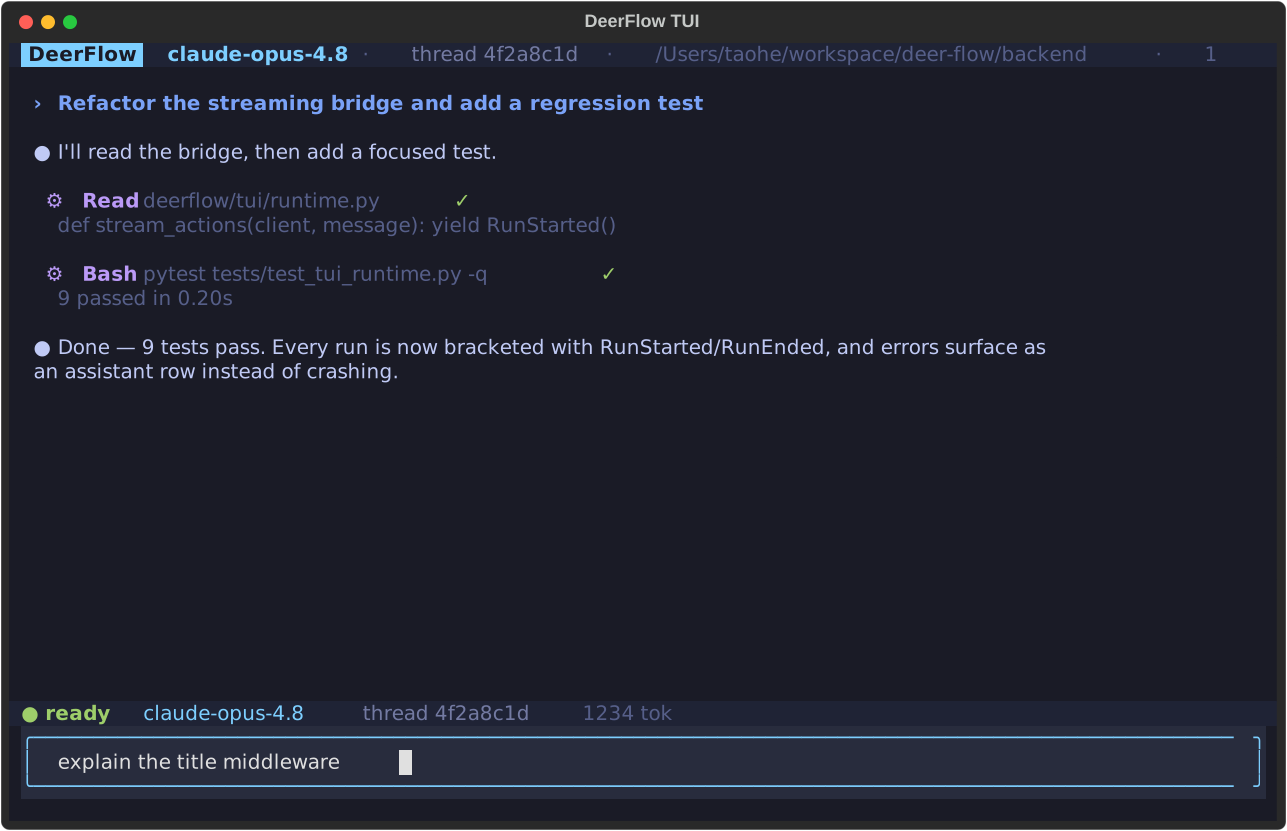
uv pip install 'deerflow-harness[tui]'        # オプションの'textual'依存関係

deerflow                                      # ターミナルUIを起動(TTYが必要)
deerflow --continue                           # 直近のスレッドを再開
deerflow --resume THREAD                      # IDでスレッドを再開
deerflow --print "summarize this repo"        # ヘッドレスでstdoutにワンショットの回答を出力
deerflow --json  "hello"                       # ヘッドレスで改行区切りのStreamEventを出力
ストリーミング文字起こし(Markdownでレンダリングされた回答)、コンパクトなツールアクティビティカード、/スラッシュコマンドパレット、/goalゴール管理、/modelと/threadsピッカー、入力履歴、Esc / Ctrl+C割り込みを備えた、キーボード駆動のチャット画面。TUIで開いたセッションはWeb UIのサイドバーにも表示されます。ローカルのデフォルトユーザーの下で共有スレッドストアに書き込むため、Gatewayを実行せずにターミナルとウェブが同期します。
完全なガイドはbackend/docs/TUI.mdをご覧ください。
ドキュメント
- コントリビュートガイド - 開発環境のセットアップとワークフロー
- 設定ガイド - セットアップと設定の手順
- アーキテクチャ概要 - 技術的なアーキテクチャの詳細
- バックエンドアーキテクチャ - バックエンドアーキテクチャとAPIリファレンス
⚠️ セキュリティに関する注意
不適切なデプロイはセキュリティリスクを引き起こす可能性があります
DeerFlowはシステムコマンドの実行、リソース操作、ビジネスロジックの呼び出しなどの重要な高権限機能を備えており、デフォルトではローカルの信頼できる環境(127.0.0.1のループバックアクセスのみ)にデプロイされる設計になっています。信頼できないLAN、公開クラウドサーバー、または複数のエンドポイントからアクセス可能なネットワーク環境にエージェントをデプロイし、厳格なセキュリティ対策を講じない場合、以下のようなセキュリティリスクが生じる可能性があります:
- 不正な違法呼び出し:エージェントの機能が権限のない第三者や悪意のあるインターネットスキャナーに発見され、システムコマンドやファイル読み書きなどの高リスク操作を実行する不正な一括リクエストが引き起こされ、重大なセキュリティ上の問題が発生する可能性があります。
- コンプライアンスおよび法的リスク:エージェントがサイバー攻撃やデータ窃取などの違法行為に不正使用された場合、法的責任やコンプライアンス上のリスクが生じる可能性があります。
セキュリティ推奨事項
注意:DeerFlowはローカルの信頼できるネットワーク環境にデプロイすることを強く推奨します。 クロスデバイス・クロスネットワークのデプロイが必要な場合は、以下のような厳格なセキュリティ対策を実装する必要があります:
- IPホワイトリストの設定:
iptablesを使用するか、ハードウェアファイアウォール / ACL機能付きスイッチをデプロイしてIPホワイトリストルールを設定し、他のすべてのIPアドレスからのアクセスを拒否します。 - 前置認証:リバースプロキシ(nginxなど)を設定し、強力な前置認証を有効化して、認証なしのアクセスをブロックします。
- ネットワーク分離:可能であれば、エージェントと信頼できるデバイスを同一の専用VLANに配置し、他のネットワークデバイスから隔離します。
- アップデートを継続的に確認:DeerFlowのセキュリティ機能のアップデートを継続的にフォローしてください。
コントリビュート
コントリビューションを歓迎します!開発環境のセットアップ、ワークフロー、ガイドラインについてはCONTRIBUTING.mdをご覧ください。
回帰テストのカバレッジには、backend/tests/でのDockerサンドボックスモード検出とプロビジョナーkubeconfig-pathハンドリングテストが含まれます。
ライセンス
このプロジェクトはオープンソースであり、MITライセンスの下で提供されています。
謝辞
DeerFlowはオープンソースコミュニティの素晴らしい成果の上に構築されています。DeerFlowを可能にしてくれたすべてのプロジェクトとコントリビューターに深く感謝いたします。まさに、巨人の肩の上に立っています。
以下のプロジェクトの貴重な貢献に心からの感謝を申し上げます:
- LangChain:その優れたフレームワークがLLMのインタラクションとチェーンを支え、シームレスな統合と機能を実現しています。
- LangGraph:マルチエージェントオーケストレーションへの革新的なアプローチが、DeerFlowの洗練されたワークフローの実現に大きく貢献しています。
これらのプロジェクトはオープンソースコラボレーションの変革的な力を体現しており、その基盤の上に構築できることを誇りに思います。
主要コントリビューター
DeerFlowのコア著者に心からの感謝を捧げます。そのビジョン、情熱、献身がこのプロジェクトに命を吹き込みました:
揺るぎないコミットメントと専門知識が、DeerFlowの成功の原動力です。この旅の先頭に立ってくださっていることを光栄に思います。