mirror of
https://github.com/alibaba/lowcode-engine.git
synced 2025-12-12 19:52:51 +00:00

4.8 KiB
4.8 KiB
title, sidebar_position
| title | sidebar_position |
|---|---|
| 接入运行时 | 1 |
低代码引擎的编辑器将产出两份数据:
- 资产包数据 assets:包含物料名称、包名及其获取方式,对应协议中的《低代码引擎资产包协议规范》
- 页面数据 schema:包含页面结构信息、生命周期和代码信息,对应协议中的《低代码引擎搭建协议规范》
经过上述两份数据,可以直接交由渲染模块或者出码模块来运行,二者的区别在于:
- 渲染模块:使用资产包数据、页面数据和低代码运行时,并且允许维护者在低代码编辑器中用
低代码(LowCode)的方式继续维护; - 出码模块:不依赖低代码运行时和页面数据,直接生成可直接运行的代码,并且允许维护者用
源码(ProCode)的方式继续维护,但无法再利用低代码编辑器;
渲染和出码的详细阐述可参考此文:低代码技术在研发团队的应用模式探讨
渲染模块
在 Demo 中,右上角有渲染模块的示例使用方式:
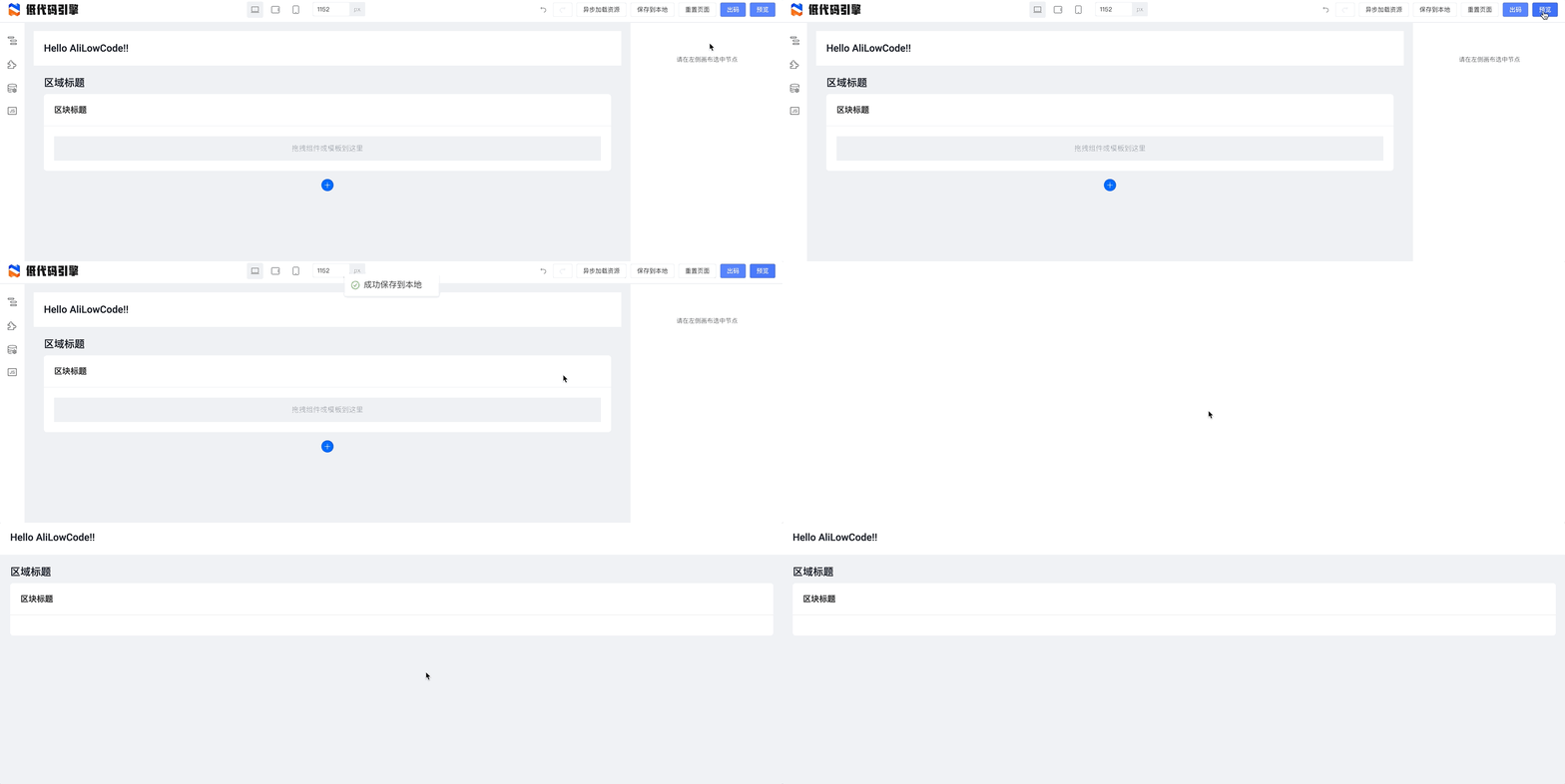
基于官方提供的渲染模块 @alifd/lowcode-react-renderer,你可以在 React 上下文渲染低代码编辑器产出的页面。
构造渲染模块所需数据
渲染模块所需要的数据需要通过编辑器产出的数据进行一定的转换,规则如下:
- schema:从编辑器产出的 projectSchema 中拿到 componentsTree 中的首项,即
projectSchema.componentsTree[0]; - components:需要根据编辑器产出的资产包 assets 中,根据页面 projectSchema 中声明依赖的 componentsMap,来加载所有依赖的资产包,最后获取资产包的实例并生成物料 - 资产包的键值对 components。
这个过程可以参考 demo 项目中的 src/preview.tsx:
async function getSchemaAndComponents() {
  const packages = JSON.parse(window.localStorage.getItem('packages') || '');
  const projectSchema = JSON.parse(window.localStorage.getItem('projectSchema') || '');
  const { componentsMap: componentsMapArray, componentsTree } = projectSchema;
  const componentsMap: any = {};
  componentsMapArray.forEach((component: any) => {
    componentsMap[component.componentName] = component;
  });
  const schema = componentsTree[0];

  const libraryMap = {};
  const libraryAsset = [];
  packages.forEach(({ package: _package, library, urls, renderUrls }) => {
    libraryMap[_package] = library;
    if (renderUrls) {
      libraryAsset.push(renderUrls);
    } else if (urls) {
      libraryAsset.push(urls);
    }
  });

  const vendors = [assetBundle(libraryAsset, AssetLevel.Library)];

  const assetLoader = new AssetLoader();
  await assetLoader.load(libraryAsset);
  const components = await injectComponents(buildComponents(libraryMap, componentsMap));

  return {
    schema,
    components,
  };
}
进行渲染
拿到 schema 和 components 以后,您可以借由资产包数据和页面数据来完成页面的渲染:
import React from 'react';
import ReactRenderer from '@alilc/lowcode-react-renderer';

const SamplePreview = () => {
  return (
    <ReactRenderer
      schema={schema}
      components={components}
    />
  );
}
注 1:您可以注意到,此处是依赖了 React 进行渲染的,对于 Vue 形态的渲染或编辑器支持,详见对应公告。
注 2:本节示例可在 Demo 代码里找到更完整的版本:https://github.com/alibaba/lowcode-demo/blob/main/demo-general/src/preview.tsx
出码模块
在 Demo 中,右上角有出码模块的示例使用方式:

本节示例可在出码插件里找到:https://github.com/alibaba/lowcode-code-generator-demo
低代码的生产和消费流程总览
经过“接入编辑器” - “接入运行时”这两节的介绍,我们已经可以了解到低代码所构建的生产和消费流程了,梳理如下图:

如上述流程所示,您一般需要一个后端项目来保存页面数据信息,如果资产包信息是动态的,也需要保存资产包信息。