mirror of
https://github.com/alibaba/lowcode-engine.git
synced 2026-03-05 09:47:20 +00:00

3.2 KiB
3.2 KiB
title, sidebar_position
| title | sidebar_position |
|---|---|
| 插件扩展 - 编排扩展 | 6 |
场景一:扩展选中节点操作项
增加节点操作项
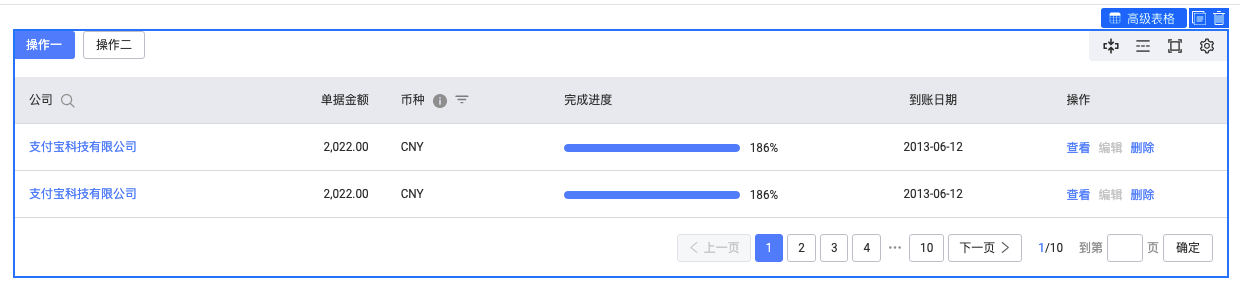
选中节点后,在选中框的右上角有操作按钮,编排模块默认实现了查看组件直系父节点、复制节点和删除节点按钮外,还可以通过相关 API 来扩展更多操作,如下代码:
import { plugins } from '@alilc/lowcode-engine';
import { ILowCodePluginContext } from '@alilc/lowcode-types';
import { Icon, Message } from '@alifd/next';

const addHelloAction = (ctx: ILowCodePluginContext) => {
  return {
    async init() {
      const { addBuiltinComponentAction } = ctx.material;
      addBuiltinComponentAction({
        name: 'hello',
        content: {
          icon: <Icon type="atm" />,
          title: 'hello',
          action(node: Node) {
            Message.show('Welcome to Low-Code engine');
          },
        },
        condition: (node: Node) => {
          return node.componentMeta.componentName === 'NextTable';
        },
        important: true,
      });
    }
  };
};
addHelloAction.pluginName = 'addHelloAction';
await plugins.register(addHelloAction);
效果如下:

具体 API 参考:API 文档
删除节点操作项
import { plugins } from '@alilc/lowcode-engine';
import { ILowCodePluginContext } from '@alilc/lowcode-types';

const removeCopyAction = (ctx: ILowCodePluginContext) => {
  return {
    async init() {
      const { removeBuiltinComponentAction } = ctx.material;
      removeBuiltinComponentAction('copy');
    }
  }
};
removeCopyAction.pluginName = 'removeCopyAction';
await plugins.register(removeCopyAction);
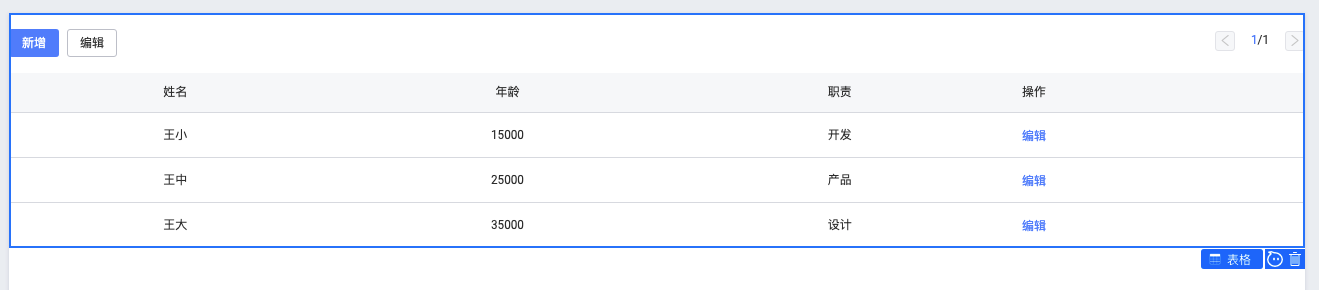
效果如下:
具体 API 参考:API 文档