mirror of
https://github.com/alibaba/lowcode-engine.git
synced 2025-12-15 13:46:33 +00:00

507 lines
12 KiB
Markdown
507 lines
12 KiB
Markdown
---
|
||
title: material - 物料 API
|
||
sidebar_position: 2
|
||
---
|
||
|
||
> **@types** [IPublicApiMaterial](https://github.com/alibaba/lowcode-engine/blob/main/packages/types/src/shell/api/material.ts)<br/>
|
||
> **@since** v1.0.0
|
||
|
||
|
||
## 模块简介
|
||
负责物料相关的 API,包括资产包、设计器辅助层、物料元数据和物料元数据管道函数。
|
||
|
||
## 变量
|
||
### componentsMap
|
||
获取组件 map 结构
|
||
```typescript
|
||
/**
|
||
* 获取组件 map 结构
|
||
* get map of components
|
||
*/
|
||
get componentsMap(): { [key: string]: IPublicTypeNpmInfo | ComponentType<any> | object } ;
|
||
```
|
||
相关类型:[IPublicTypeNpmInfo](https://github.com/alibaba/lowcode-engine/blob/main/packages/types/src/shell/type/npm-info.ts)
|
||
|
||
## 方法
|
||
|
||
### 资产包
|
||
#### setAssets
|
||
设置「[资产包](/site/docs/specs/lowcode-spec#2-协议结构)」结构
|
||
|
||
```typescript
|
||
/**
|
||
* 设置「资产包」结构
|
||
* set data for Assets
|
||
* @returns void
|
||
*/
|
||
setAssets(assets: IPublicTypeAssetsJson): void;
|
||
```
|
||
相关类型:[IPublicTypeAssetsJson](https://github.com/alibaba/lowcode-engine/blob/main/packages/types/src/shell/type/assets-json.ts)
|
||
|
||
|
||
##### 示例
|
||
直接在项目中引用 npm 包
|
||
```javascript
|
||
import { material } from '@alilc/lowcode-engine';
|
||
import assets from '@alilc/mc-assets-<siteId>/assets.json';
|
||
|
||
material.setAssets(assets);
|
||
```
|
||
|
||
通过接口动态引入资产包
|
||
```typescript
|
||
import { material, plugins } from '@alilc/lowcode-engine';
|
||
import { IPublicModelPluginContext } from '@alilc/lowcode-types';
|
||
|
||
// 动态加载 assets
|
||
plugins.register((ctx: IPublicModelPluginContext) => {
|
||
return {
|
||
name: 'ext-assets',
|
||
async init() {
|
||
try {
|
||
// 将下述链接替换为您的物料描述地址即可。
|
||
const res = await window.fetch('https://fusion.alicdn.com/assets/default@0.1.95/assets.json');
|
||
const assets = await res.text();
|
||
material.setAssets(assets);
|
||
} catch (err) {
|
||
console.error(err);
|
||
};
|
||
},
|
||
};
|
||
}).catch(err => console.error(err));
|
||
```
|
||
|
||
#### getAssets
|
||
获取「资产包」结构
|
||
|
||
```typescript
|
||
/**
|
||
* 获取「资产包」结构
|
||
* get AssetsJson data
|
||
* @returns IPublicTypeAssetsJson
|
||
*/
|
||
getAssets(): IPublicTypeAssetsJson;
|
||
```
|
||
相关类型:[IPublicTypeAssetsJson](https://github.com/alibaba/lowcode-engine/blob/main/packages/types/src/shell/type/assets-json.ts)
|
||
|
||
|
||
##### 示例
|
||
```typescript
|
||
import { material } from '@alilc/lowcode-engine';
|
||
|
||
material.getAssets();
|
||
```
|
||
|
||
#### loadIncrementalAssets
|
||
加载增量的「资产包」结构,该增量包会与原有的合并
|
||
|
||
```typescript
|
||
/**
|
||
* 加载增量的「资产包」结构,该增量包会与原有的合并
|
||
* load Assets incrementally, and will merge this with exiting assets
|
||
* @param incrementalAssets
|
||
* @returns
|
||
*/
|
||
loadIncrementalAssets(incrementalAssets: IPublicTypeAssetsJson): Promise<void>;
|
||
```
|
||
相关类型:[IPublicTypeAssetsJson](https://github.com/alibaba/lowcode-engine/blob/main/packages/types/src/shell/type/assets-json.ts)
|
||
|
||
##### 示例
|
||
```typescript
|
||
import { material } from '@alilc/lowcode-engine';
|
||
import assets1 from '@alilc/mc-assets-<siteId>/assets.json';
|
||
import assets2 from '@alilc/mc-assets-<siteId>/assets.json';
|
||
|
||
material.setAssets(assets1);
|
||
material.loadIncrementalAssets(assets2);
|
||
```
|
||
|
||
更新特定物料的描述文件
|
||
|
||
```typescript
|
||
import { material } from '@alilc/lowcode-engine';
|
||
material.loadIncrementalAssets({
|
||
version: '',
|
||
components: [
|
||
{
|
||
"componentName": 'Button',
|
||
"props": [{ name: 'new', title: 'new', propType: 'string' }]
|
||
}
|
||
],
|
||
})
|
||
```
|
||
|
||
### 设计器辅助层
|
||
#### addBuiltinComponentAction
|
||
在设计器辅助层增加一个扩展 action
|
||
|
||
```typescript
|
||
/**
|
||
* 在设计器辅助层增加一个扩展 action
|
||
* add an action button in canvas context menu area
|
||
* @param action
|
||
*/
|
||
addBuiltinComponentAction(action: IPublicTypeComponentAction): void;
|
||
```
|
||
相关类型:[IPublicTypeComponentAction](https://github.com/alibaba/lowcode-engine/blob/main/packages/types/src/shell/type/component-action.ts)
|
||
|
||
|
||
##### 示例
|
||
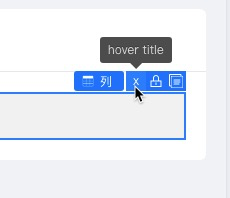
新增设计扩展位,并绑定事件
|
||
```typescript
|
||
import { material } from '@alilc/lowcode-engine';
|
||
|
||
material.addBuiltinComponentAction({
|
||
name: 'myIconName',
|
||
content: {
|
||
icon: () => 'x',
|
||
title: 'hover title',
|
||
action(node) {
|
||
console.log('myIconName 扩展位被点击');
|
||
}
|
||
},
|
||
important: true,
|
||
condition: true,
|
||
});
|
||
```
|
||
|
||
|
||
#### removeBuiltinComponentAction
|
||
移除设计器辅助层的指定 action
|
||
|
||
```typescript
|
||
/**
|
||
* 移除设计器辅助层的指定 action
|
||
* remove a builtin action button from canvas context menu area
|
||
* @param name
|
||
*/
|
||
removeBuiltinComponentAction(name: string): void;
|
||
```
|
||
|
||
##### 内置设计器辅助 name
|
||
|
||
- remove:删除
|
||
- hide:隐藏
|
||
- copy:复制
|
||
- lock:锁定,不可编辑
|
||
- unlock:解锁,可编辑
|
||
|
||
##### 示例
|
||
```typescript
|
||
import { material } from '@alilc/lowcode-engine';
|
||
|
||
material.removeBuiltinComponentAction('myIconName');
|
||
```
|
||
|
||
|
||
#### modifyBuiltinComponentAction
|
||
修改已有的设计器辅助层的指定 action
|
||
|
||
```typescript
|
||
/**
|
||
* 修改已有的设计器辅助层的指定 action
|
||
* modify a builtin action button in canvas context menu area
|
||
* @param actionName
|
||
* @param handle
|
||
*/
|
||
modifyBuiltinComponentAction(
|
||
actionName: string,
|
||
handle: (action: IPublicTypeComponentAction) => void,
|
||
): void;
|
||
```
|
||
相关类型:[IPublicTypeComponentAction](https://github.com/alibaba/lowcode-engine/blob/main/packages/types/src/shell/type/component-action.ts)
|
||
|
||
|
||
##### 内置设计器辅助 name
|
||
|
||
- remove:删除
|
||
- hide:隐藏
|
||
- copy:复制
|
||
- lock:锁定,不可编辑
|
||
- unlock:解锁,可编辑
|
||
|
||
|
||
|
||
##### 示例
|
||
给原始的 remove 扩展时间添加执行前后的日志
|
||
```typescript
|
||
import { material } from '@alilc/lowcode-engine';
|
||
|
||
material.modifyBuiltinComponentAction('remove', (action) => {
|
||
const originAction = action.content.action;
|
||
action.content.action = (node) => {
|
||
console.log('before reomve!');
|
||
originAction(node);
|
||
console.log('after remove!');
|
||
}
|
||
});
|
||
```
|
||
|
||
### 右键菜单项
|
||
#### addContextMenuOption
|
||
|
||
添加右键菜单项
|
||
|
||
```typescript
|
||
/**
|
||
* 添加右键菜单项
|
||
* @param action
|
||
*/
|
||
addContextMenuOption(action: IPublicTypeContextMenuAction): void;
|
||
```
|
||
|
||
示例
|
||
|
||
```typescript
|
||
import { IPublicEnumContextMenuType } from '@alilc/lowcode-types';
|
||
|
||
material.addContextMenuOption({
|
||
name: 'parentItem',
|
||
title: 'Parent Item',
|
||
condition: (nodes) => true,
|
||
items: [
|
||
{
|
||
name: 'childItem1',
|
||
title: 'Child Item 1',
|
||
action: (nodes) => console.log('Child Item 1 clicked', nodes),
|
||
condition: (nodes) => true
|
||
},
|
||
// 分割线
|
||
{
|
||
type: IPublicEnumContextMenuType.SEPARATOR
|
||
name: 'separator.1'
|
||
}
|
||
// 更多子菜单项...
|
||
]
|
||
});
|
||
|
||
```
|
||
|
||
#### removeContextMenuOption
|
||
|
||
删除特定右键菜单项
|
||
|
||
```typescript
|
||
/**
|
||
* 删除特定右键菜单项
|
||
* @param name
|
||
*/
|
||
removeContextMenuOption(name: string): void;
|
||
```
|
||
|
||
#### adjustContextMenuLayout
|
||
|
||
调整右键菜单项布局,每次调用都会覆盖之前注册的调整函数,只有最后注册的函数会被应用。
|
||
|
||
```typescript
|
||
/**
|
||
* 调整右键菜单项布局
|
||
* @param actions
|
||
*/
|
||
adjustContextMenuLayout(fn: (actions: IPublicTypeContextMenuItem[]) => IPublicTypeContextMenuItem[]): void;
|
||
```
|
||
|
||
**示例**
|
||
|
||
通过 adjustContextMenuLayout 补充分割线
|
||
|
||
```typescript
|
||
material.adjustContextMenuLayout((actions: IPublicTypeContextMenuAction) => {
|
||
const names = ['a', 'b'];
|
||
const newActions = [];
|
||
actions.forEach(d => {
|
||
newActions.push(d);
|
||
if (names.include(d.name)) {
|
||
newActions.push({ type: 'separator' })
|
||
}
|
||
});
|
||
return newActions
|
||
})
|
||
```
|
||
|
||
### 物料元数据
|
||
|
||
#### getComponentMeta
|
||
获取指定名称的物料元数据
|
||
|
||
```typescript
|
||
/**
|
||
* 获取指定名称的物料元数据
|
||
* get component meta by component name
|
||
* @param componentName
|
||
* @returns
|
||
*/
|
||
getComponentMeta(componentName: string): IPublicModelComponentMeta | null;
|
||
```
|
||
相关类型:[IPublicModelComponentMeta](https://github.com/alibaba/lowcode-engine/blob/main/packages/types/src/shell/model/component-meta.ts)
|
||
|
||
##### 示例
|
||
```typescript
|
||
import { material } from '@alilc/lowcode-engine';
|
||
|
||
material.getComponentMeta('Input');
|
||
```
|
||
|
||
#### getComponentMetasMap
|
||
|
||
获取所有已注册的物料元数据
|
||
|
||
```typescript
|
||
/**
|
||
* 获取所有已注册的物料元数据
|
||
* get map of all component metas
|
||
* @returns
|
||
*/
|
||
getComponentMetasMap(): Map<string, IPublicModelComponentMeta>;
|
||
```
|
||
相关类型:[IPublicModelComponentMeta](https://github.com/alibaba/lowcode-engine/blob/main/packages/types/src/shell/model/component-meta.ts)
|
||
|
||
##### 示例
|
||
```typescript
|
||
import { material } from '@alilc/lowcode-engine';
|
||
|
||
material.getComponentMetasMap();
|
||
```
|
||
|
||
#### refreshComponentMetasMap
|
||
|
||
刷新 componentMetasMap,可触发模拟器里的 components 重新构建
|
||
|
||
**@since v1.1.7**
|
||
|
||
```typescript
|
||
refreshComponentMetasMap(): void;
|
||
```
|
||
|
||
### 物料元数据管道函数
|
||
#### registerMetadataTransducer
|
||
注册物料元数据管道函数,在物料信息初始化时执行。
|
||
|
||
```typescript
|
||
/**
|
||
* 注册物料元数据管道函数,在物料信息初始化时执行。
|
||
* register transducer to process component meta, which will be
|
||
* excuted during component meta`s initialization
|
||
* @param transducer
|
||
* @param level
|
||
* @param id
|
||
*/
|
||
registerMetadataTransducer(
|
||
transducer: IPublicTypeMetadataTransducer,
|
||
level?: number,
|
||
id?: string | undefined
|
||
): void;
|
||
```
|
||
|
||
##### 示例
|
||
给每一个组件的配置添加高级配置面板,其中有一个是否渲染配置项
|
||
```typescript
|
||
import { material } from '@alilc/lowcode-engine'
|
||
|
||
function addonCombine(metadata: TransformedComponentMetadata) {
|
||
const { componentName, configure = {} } = metadata;
|
||
const advanceGroup = [];
|
||
const combined: FieldConfig[] = [];
|
||
|
||
advanceGroup.push({
|
||
name: getConvertedExtraKey('condition'),
|
||
title: { type: 'i18n', 'zh-CN': '是否渲染', 'en-US': 'Condition' },
|
||
defaultValue: true,
|
||
setter: [
|
||
{
|
||
componentName: 'BoolSetter',
|
||
},
|
||
{
|
||
componentName: 'VariableSetter',
|
||
},
|
||
],
|
||
extraProps: {
|
||
display: 'block',
|
||
},
|
||
});
|
||
|
||
combined.push({
|
||
name: '#advanced',
|
||
title: { type: 'i18n', 'zh-CN': '高级', 'en-US': 'Advanced' },
|
||
items: advanceGroup,
|
||
});
|
||
|
||
return {
|
||
...metadata,
|
||
configure: {
|
||
...configure,
|
||
combined,
|
||
},
|
||
};
|
||
}
|
||
|
||
material.registerMetadataTransducer(addonCombine, 1, 'parse-func');
|
||
```
|
||
|
||
删除高级 Tab
|
||
|
||
```typescript
|
||
import { material } from '@alilc/lowcode-engine';
|
||
import { IPublicTypeFieldConfig } from '@alilc/lowcode-types';
|
||
|
||
material.registerMetadataTransducer((transducer) => {
|
||
const combined: IPublicTypeFieldConfig[] = [];
|
||
|
||
transducer.configure.combined?.forEach(d => {
|
||
if (d.name !== '#advanced') {
|
||
combined.push(d);
|
||
}
|
||
});
|
||
|
||
return {
|
||
...transducer,
|
||
configure: {
|
||
...transducer.configure,
|
||
combined,
|
||
}
|
||
};
|
||
}, 111, 'parse-func');
|
||
```
|
||
|
||
#### getRegisteredMetadataTransducers
|
||
获取所有物料元数据管道函数
|
||
|
||
```typescript
|
||
/**
|
||
* 获取所有物料元数据管道函数
|
||
* get all registered metadata transducers
|
||
* @returns {IPublicTypeMetadataTransducer[]}
|
||
*/
|
||
getRegisteredMetadataTransducers(): IPublicTypeMetadataTransducer[];
|
||
```
|
||
|
||
##### 示例
|
||
```typescript
|
||
import { material } from '@alilc/lowcode-engine'
|
||
|
||
material.getRegisteredMetadataTransducers();
|
||
```
|
||
## 事件
|
||
### onChangeAssets
|
||
监听 assets 变化的事件
|
||
|
||
```typescript
|
||
/**
|
||
* 监听 assets 变化的事件
|
||
* add callback for assets changed event
|
||
* @param fn
|
||
*/
|
||
onChangeAssets(fn: () => void): IPublicTypeDisposable;
|
||
```
|
||
|
||
相关类型:[IPublicTypeDisposable](https://github.com/alibaba/lowcode-engine/blob/main/packages/types/src/shell/type/disposable.ts)
|
||
|
||
##### 示例
|
||
```typescript
|
||
import { material } from '@alilc/lowcode-engine';
|
||
|
||
material.onChangeAssets(() => {
|
||
console.log('asset changed');
|
||
});
|
||
```
|