
13 KiB
Communicative Agents for Software Development

【English | Chinese | Japanese | Korean | Filipino | French | Slovak】
【📚 Wiki | 🚀 Local Demo | 👥 Community Built Software | 🔧 Customization】
📖 Prehľad
- ChatDev je virtuálna softvérová spoločnosť, ktorá pôsobí prostredníctvom rôznych inteligentných agentov.
rôznych funkcií, vrátane riaditeľa
 , produktového riaditeľa
  , technologického riaditeľa
  , programátor
  , recenzent
  , tester
  , výtvarník
  . Týto
agenti tvoria multiagentovú organizačnú štruktúru a spája ich poslanie "revolučne zmeniť digitálny svet
prostredníctvom programovania." Agenti v rámci ChatDev spolupracujú účasťou na špecializovaných funkčných seminároch,
vrátane úloh, ako je navrhovanie, kódovanie, testovanie a dokumentovanie.
. Týto
agenti tvoria multiagentovú organizačnú štruktúru a spája ich poslanie "revolučne zmeniť digitálny svet
prostredníctvom programovania." Agenti v rámci ChatDev spolupracujú účasťou na špecializovaných funkčných seminároch,
vrátane úloh, ako je navrhovanie, kódovanie, testovanie a dokumentovanie. - Hlavným cieľom ChatDev je ponúknuť jednoduchý, vysoko prispôsobiteľný a rozšíriteľný rámec, ktorý je založený na veľkých jazykových modeloch (LLM) a slúži ako ideálny scenár na štúdium kolektívnej inteligencie.

🎉 Novinky
-
- septembra 2023: Teraz je k dispozícii funkcia Git, ktorá umožňuje programátorovi využívať GitHub na version control. Ak chcete túto funkciu povoliť, jednoducho nastavte
"git_management"na"True"v súboreChatChainConfig.json.
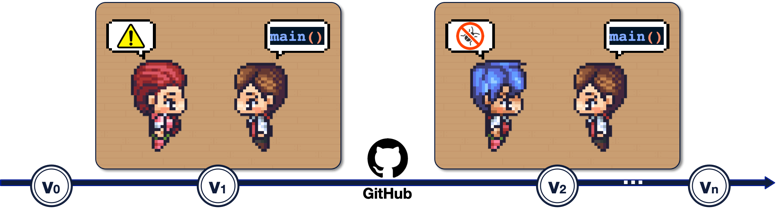
- septembra 2023: Teraz je k dispozícii funkcia Git, ktorá umožňuje programátorovi
-
- septembra 2023: Režim Human-Agent-Interaction je teraz k dispozícii! Môžete sa zapojiť do tímu ChatDev tým, že budete hrať úlohu recenzenta a predkladať návrhy programátorovi ;
skúste
python3 run.py --task [description_of_your_idea] --config "Human". Pozri návod a príklad.

- septembra 2023: Režim Human-Agent-Interaction je teraz k dispozícii! Môžete sa zapojiť do tímu ChatDev tým, že budete hrať úlohu recenzenta
-
- august 2023: Systém je verejne dostupný.
-
- augusta 2023: Verzia v1.0.0 bola pripravená na vydanie.
-
- júla 2023: Používatelia si môžu prispôsobiť nastavenia ChatChain, Phase a Role. Okrem toho je k dispozícii režim online záznamu aj replay režim sú teraz podporované.
-
- júla 2023: Bol uverejnený článok preprint paper súvisiaci s týmto projektom.
-
- júna 2023: Bola vydaná počiatočná verzia repozitára ChatDev.
❓ Čo dokáže ChatDev?
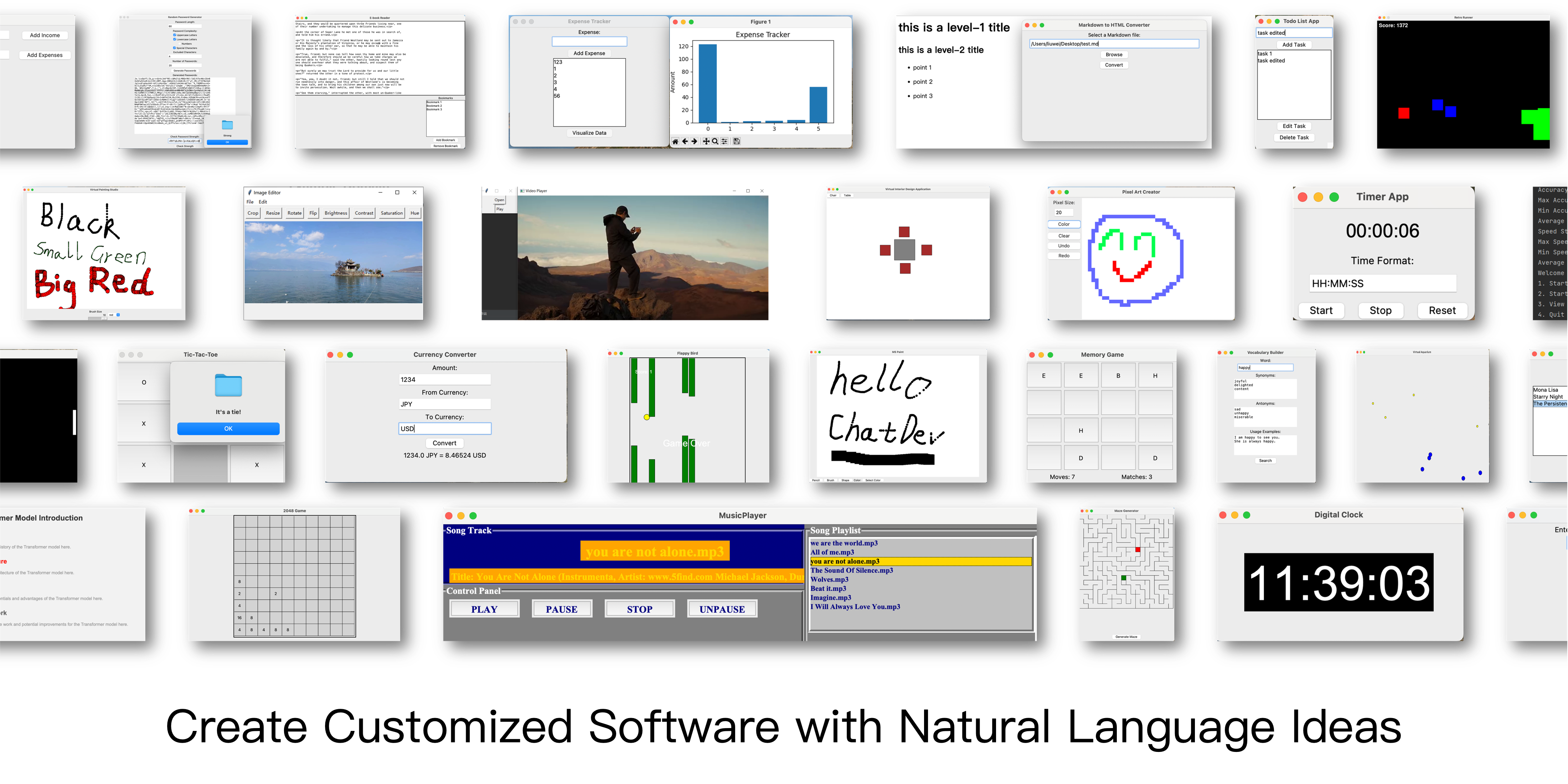
https://github.com/OpenBMB/ChatDev/assets/11889052/80d01d2f-677b-4399-ad8b-f7af9bb62b72
⚡️ Quickstart
Ak chcete začať, postupujte podľa týchto krokov:
- Klonovanie úložiska GitHub: Začnite klonovaním úložiska pomocou príkazu:
git clone https://github.com/OpenBMB/ChatDev.git - Nastavenie prostredia Python: Uistite sa, že máte prostredie Python vo verzii 3.9 alebo vyššej. Môžete vytvoriť a
toto prostredie aktivovať pomocou nasledujúcich príkazov, pričom
ChatDev_conda_envnahradíte preferovaným prostredím name (názov):conda create -n ChatDev_conda_env python=3.9 -y conda activate ChatDev_conda_env - Inštalácia závislostí: Presuňte sa do adresára
ChatDeva nainštalujte potrebné závislosti spustením:cd ChatDev pip3 install -r requirements.txt - Nastavenie kľúča API OpenAI: Exportujte svoj kľúč API OpenAI ako premennú prostredia. Nahraďte
"your_OpenAI_API_key"svojím skutočným kľúčom API. Nezabudnite, že táto premenná prostredia je špecifická pre reláciu, takže ju musíte nastaviť znova, ak otvoríte novú reláciu terminálu. V systéme Unix/Linux:
V systéme Windows:export OPENAI_API_KEY="your_OpenAI_API_key"$env:OPENAI_API_KEY="your_OpenAI_API_key" - Zostavenie softvéru: Na spustenie zostavovania softvéru použite nasledujúci príkaz,
pričom
[description_of_your_idea]nahradíte opisom svojho nápadu a[project_name]požadovaným projektom name: V systéme Unix/Linux:
V systéme Windows:python3 run.py --task "[description_of_your_idea]" --name "[project_name]"python run.py --task "[description_of_your_idea]" --name "[project_name]" - Spustenie softvéru: Po vygenerovaní nájdete svoj softvér v adresári
WareHousepod konkrétnym priečinku projektu, napríkladnázov_projektu_Východisková_organizácia_časová značka. Spustite svoj softvér pomocou nasledujúceho príkazu v tomto adresári: V systéme Unix/Linux:
Na Windowsecd WareHouse/project_name_DefaultOrganization_timestamp python3 main.pycd WareHouse/project_name_DefaultOrganization_timestamp python main.py
✨️ Advanced Skills
For more detailed information, please refer to our Wiki, where you can find:
- An introduction to all command run parameters.
- A straightforward guide for setting up a local web demo, which includes enhanced visualized logs, a replay demo, and a simple ChatChain Visualizer.
- An overview of the ChatDev framework.
- A comprehensive introduction to all advanced parameters in ChatChain configuration.
- Guides for customizing ChatDev, including:
- ChatChain: Design your own software development process (or any other process), such
as
DemandAnalysis -> Coding -> Testing -> Manual. - Phase: Design your own phase within ChatChain, like
DemandAnalysis. - Role: Defining the various agents in your company, such as the
Chief Executive Officer.
- ChatChain: Design your own software development process (or any other process), such
as
🤗 Share Your Software!
Code: We are enthusiastic about your interest in participating in our open-source project. If you come across any problems, don't hesitate to report them. Feel free to create a pull request if you have any inquiries or if you are prepared to share your work with us! Your contributions are highly valued. Please let me know if there's anything else you need assistance!
Company: Creating your own customized "ChatDev Company" is a breeze. This personalized setup involves three simple
configuration JSON files. Check out the example provided in the CompanyConfig/Default directory. For detailed
instructions on customization, refer to our Wiki.
Software: Whenever you develop software using ChatDev, a corresponding folder is generated containing all the
essential information. Sharing your work with us is as simple as making a pull request. Here's an example: execute the
command python3 run.py --task "design a 2048 game" --name "2048" --org "THUNLP" --config "Default". This will
create a software package and generate a folder named /WareHouse/2048_THUNLP_timestamp. Inside, you'll find:
- All the files and documents related to the 2048 game software
- Configuration files of the company responsible for this software, including the three JSON config files
from
CompanyConfig/Default - A comprehensive log detailing the software's building process that can be used to replay (
timestamp.log) - The initial prompt used to create this software (
2048.prompt)
See community contributed software here!
👨💻 Software Contributors


🔎 Citation
@misc{qian2023communicative,
      title={Communicative Agents for Software Development},
      author={Chen Qian and Xin Cong and Wei Liu and Cheng Yang and Weize Chen and Yusheng Su and Yufan Dang and Jiahao Li and Juyuan Xu and Dahai Li and Zhiyuan Liu and Maosong Sun},
      year={2023},
      eprint={2307.07924},
      archivePrefix={arXiv},
      primaryClass={cs.SE}
}
⚖️ License
- Source Code Licensing: Our project's source code is licensed under the Apache 2.0 License. This license permits the use, modification, and distribution of the code, subject to certain conditions outlined in the Apache 2.0 License.
- Project Open-Source Status: The project is indeed open-source; however, this designation is primarily intended for non-commercial purposes. While we encourage collaboration and contributions from the community for research and non-commercial applications, it is important to note that any utilization of the project's components for commercial purposes necessitates separate licensing agreements.
- Data Licensing: The related data utilized in our project is licensed under CC BY-NC 4.0. This license explicitly permits non-commercial use of the data. We would like to emphasize that any models trained using these datasets should strictly adhere to the non-commercial usage restriction and should be employed exclusively for research purposes.
🌟 Star History
🤝 Acknowledgments




📬 Contact
If you have any questions, feedback, or would like to get in touch, please feel free to reach out to us via email at chatdev.openbmb@outlook.com