mirror of
https://github.com/alibaba/lowcode-engine.git
synced 2026-06-09 08:52:21 +00:00

199 lines
6.2 KiB
Markdown
199 lines
6.2 KiB
Markdown
---
|
||
title: 低代码生态脚手架 & 调试机制
|
||
sidebar_position: 8
|
||
---
|
||
## 脚手架简述
|
||
|
||
在 fork 低代码编辑器 demo 项目后,您可以直接在项目中任意扩展低代码编辑器。如果您想要将自己的组件/插件/设置器封装成一个独立的 npm 包并提供给社区,您可以使用我们的低代码脚手架建立低代码扩展。
|
||
|
||
> Windows 开发者请在 WSL 环境下使用开发工具
|
||
>
|
||
> WSL 中文 doc:[https://docs.microsoft.com/zh-cn/windows/wsl/install](https://docs.microsoft.com/zh-cn/windows/wsl/install)
|
||
>
|
||
> 中文教程:[https://blog.csdn.net/weixin_45027467/article/details/106862520](https://blog.csdn.net/weixin_45027467/article/details/106862520)
|
||
|
||
|
||
## 脚手架功能
|
||
### 脚手架初始化
|
||
|
||
```bash
|
||
npm init @alilc/element your-element-name
|
||
```
|
||
不写 your-element-name 的情况下,则在当前目录创建。
|
||
|
||
> 注 1:如遇错误提示 `sh: create-element: command not found` 可先执行下述命令
|
||
```bash
|
||
npm install -g @alilc/create-element
|
||
```
|
||
|
||
> 注 2:觉得安装速度比较慢的同学,可以设置 npm 国内镜像,如
|
||
```bash
|
||
npm init @alilc/element your-element-name --registry=https://registry.npmmirror.com
|
||
```
|
||
|
||
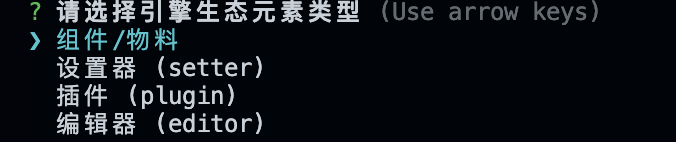
选择对应的元素类型,并填写对应的问题,即可完成创建。
|
||
|
||
|
||
|
||
### 脚手架本地环境调试
|
||
|
||
```bash
|
||
cd your-element-name
|
||
npm install
|
||
npm start
|
||
```
|
||
|
||
### 脚手架构建
|
||
|
||
```bash
|
||
npm run build
|
||
```
|
||
|
||
### 脚手架发布
|
||
|
||
修改版本号后,执行如下指令即可:
|
||
|
||
```bash
|
||
npm publish
|
||
```
|
||
|
||
## 🔥🔥🔥 在低代码项目中调试物料/插件/设置器
|
||
|
||
> 📢📢📢 低代码生态脚手架提供的调试利器,在启动 setter/插件/物料 项目后,直接在已有的低代码平台就可以调试,不需要 npm link / 手改 npm main 入口等传统方式,轻松上手,强烈推荐使用!!
|
||
|
||
### 组件/插件/Setter 侧
|
||
|
||
1. 插件/setter 在原有 alt 的配置中添加相关的调试配置
|
||
```json
|
||
// build.json 中
|
||
{
|
||
"plugins": [
|
||
[
|
||
"@alilc/build-plugin-alt",
|
||
{
|
||
"type": "plugin",
|
||
"inject": true, // 开启注入调试
|
||
// 配置要打开的页面,在注入调试模式下,不配置此项的话不会打开浏览器
|
||
// 支持直接使用官方 demo 项目:https://lowcode-engine.cn/demo/index.html
|
||
"openUrl": "https://lowcode-engine.cn/demo/index.html?debug"
|
||
}
|
||
],
|
||
]
|
||
}
|
||
```
|
||
|
||
2. 组件需先安装 @alilc/build-plugin-alt,再将组件内的 `build.lowcode.js`文件修改如下
|
||
```javascript
|
||
const { library } = require('./build.json');
|
||
|
||
module.exports = {
|
||
alias: {
|
||
'@': './src',
|
||
},
|
||
plugins: [
|
||
[
|
||
// lowcode 的配置保持不变,这里仅为示意。
|
||
'@alifd/build-plugin-lowcode',
|
||
{
|
||
library,
|
||
engineScope: "@alilc"
|
||
},
|
||
],
|
||
[
|
||
'@alilc/build-plugin-alt',
|
||
{
|
||
type: 'component',
|
||
inject: true,
|
||
library,
|
||
// 配置要打开的页面,在注入调试模式下,不配置此项的话不会打开浏览器
|
||
// 支持直接使用官方 demo 项目:https://lowcode-engine.cn/demo/index.html
|
||
openUrl: "https://lowcode-engine.cn/demo/index.html?debug"
|
||
}
|
||
]],
|
||
};
|
||
```
|
||
|
||
3. 本地组件/插件/Setter正常启动调试,在项目的访问地址增加 debug,即可开启注入调试。
|
||
```url
|
||
https://lowcode-engine.cn/demo/demo-general/index.html?debug
|
||
```
|
||
|
||
### 项目侧的准备
|
||
|
||
> 如果你的低代码项目 fork 自官方 demo,那么项目侧的准备已经就绪,不用再看以下内容~
|
||
|
||
1. 安装 @alilc/lowcode-plugin-inject
|
||
```bash
|
||
npm i @alilc/lowcode-plugin-inject --save-dev
|
||
```
|
||
|
||
2. 在引擎初始化侧引入插件
|
||
```typescript
|
||
import Inject, { injectAssets } from '@alilc/lowcode-plugin-inject';
|
||
import { IPublicModelPluginContext } from '@alilc/lowcode-types';
|
||
|
||
export default async () => {
|
||
// 注意 Inject 插件必须在其他插件前注册,且所有插件的注册必须 await
|
||
await plugins.register(Inject);
|
||
await plugins.register(OtherPlugin);
|
||
await plugins.register((ctx: IPublicModelPluginContext) => {
|
||
return {
|
||
name: "editor-init",
|
||
async init() {
|
||
// 设置物料描述前,使用插件提供的 injectAssets 进行处理
|
||
const { material, project } = ctx;
|
||
material.setAssets(await injectAssets(assets));
|
||
},
|
||
};
|
||
});
|
||
}
|
||
```
|
||
|
||
3. 在 saveSchema 时过滤掉插入的 url,避免影响渲染态
|
||
```typescript
|
||
import { filterPackages } from '@alilc/lowcode-plugin-inject';
|
||
export const saveSchema = async () => {
|
||
// ...
|
||
const packages = await filterPackages(editor.get('assets').packages);
|
||
window.localStorage.setItem(
|
||
'packages',
|
||
JSON.stringify(packages),
|
||
);
|
||
// ...
|
||
};
|
||
```
|
||
|
||
4. 如果希望预览态也可以注入调试组件,则需要在 preview 逻辑里插入组件
|
||
```javascript
|
||
import { injectComponents } from '@alilc/lowcode-plugin-inject';
|
||
|
||
async function init() {
|
||
// 在传递给 ReactRenderer 前,先通过 injectComponents 进行处理
|
||
const components = await injectComponents(buildComponents(libraryMap, componentsMap));
|
||
// ...
|
||
}
|
||
```
|
||
|
||
注:若控制台出现如下错误,直接访问一次该 url 即可~
|
||
|
||

|
||
|
||
|
||
## Meta 信息
|
||
meta 信息是放在生态元素 package.json 中的一小段 json,用户可以通过 meta 了解到这个元素的一些基本信息,如元素类型,一些入口信息等。
|
||
|
||
```typescript
|
||
interface LcMeta {
|
||
type: 'plugin' | 'setter' | 'component'; // 元素类型,尚未实现
|
||
pluginName: string; // 插件名,仅插件包含
|
||
meta: {
|
||
dependencies: string[]; // 插件依赖的其他插件列表,仅插件包含
|
||
engines: {
|
||
lowcodeEngine: string; // 适配的引擎版本
|
||
}
|
||
prototype: string; // 物料描述入口,仅组件包含,尚未实现
|
||
prototypeView: string; // 物料设计态入口,仅组件包含,尚未实现
|
||
}
|
||
}
|
||
```
|